Improvement releases
Theme editor navigation improvements
We added some small but useful updates to the theme editor to improve navigation between tabs and groups.
- When going between tabs, the theme editor will now remember which group you had open and show that group when you go back to the tab.
- If you close a group, then the editor remembers your scroll position so that the group is visible again and it's highlighted.
Storage app payment information updates
We added a few updates to the Storage app regarding payment information.
- When bulk processing invoices, it will now show you why a customer was not included in the list.
- Anywhere customers are show in tables (like the customer table, invoices, or subscriptions) the table will now include information about the primary payment method the customer has. This makes it easier to see if a customer has a payment method on file.
- Invoice tables now show the status of the subscription that the invoice is for. You can also filter by the subscription status.
Breadcrumbs now have their own Twig template file
This is a small improvement, but one that will help developers. The breadcrumb template has historically only been saved in the website database, but now it is also saved as a Twig template file. This means that you can track it in GIT with the rest of your templates. It gets saved to "site/breadcrumb.twig" within your theme templates folder.
Modals are now draggable and resizable
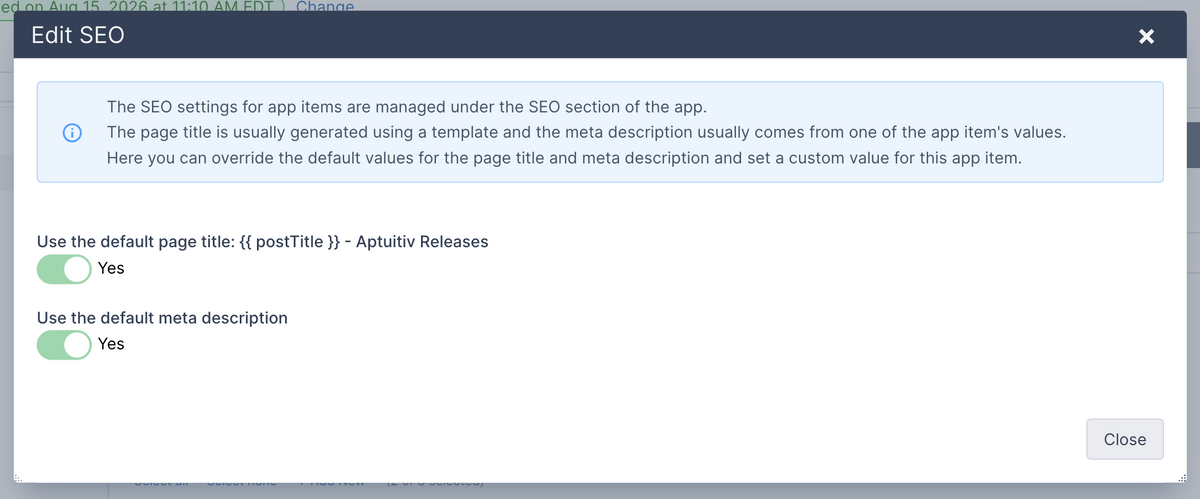
Modals, also knows as "pop ups" are used a lot in our CMS software for showing additional fields and content to update. Previously they displayed centered on the page and you couldn't change that.
Now you can drag modals around on the page by clicking the dark title bar at the top and moving your mouse around. (You can also hold down Option+Shift and use the arrows to move it around.) If the same modal is reopened then it will remember it's last position.
You can also resize modals by dragging on the left, right or bottom edges. Or drag from the bottom-right or bottom-left corners.
This is a small update, but really useful if the modal is covering up something you need to reference while working in the modal.
App item URLs in the app item table
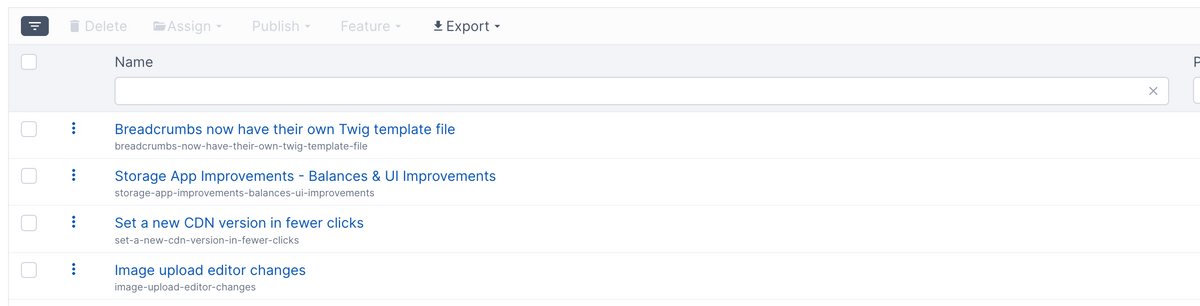
The Pages app has shown the URL of the page below the page name for a while. Now all app items do too.
This is useful in a few ways including:
- Easily see what the URL is for the item in case you need to change it.
- You can now filter the table by the item URL to find specific items. Useful for finding an item to update when doing an SEO or accessibility audit.
Storage App Improvements - Balances & UI Improvements
Multiple improvements to the Storage app in this release.
Fixed calculating the initial rent period
Fixed an issue with calculating the correct number of initial months to rent when it's more than 1 month. We allow setting an initial rental period to be more than one month, and sometimes the initial rent period wasn't calculated correctly. Now it is.
New setting to force renting whole units of the initial rent period
To help ensure the ideal initial rental period, we added a new setting called "Should the initial rent period be rounded up to the nearest whole number of periods?".
If that's set to "Yes", then the initial rent period will always be at least 1 month, 2 months, 3 months - whatever the initial rent period is configured to. This allows the initial rent period to always be a minimum of the configured rent period, or prorated so it's close.
If a storage company has an initial rental period of 1 month, they likely want this off so that someone renting in the beginning of a month isn't charged almost two months. But if you've configured the initial rental period to be more than 1 month, you likely want to turn this on because you likely want the initial period to be at least 2, 3, or whatever number of months you picked. If it's turned on then it'll be the number of months + a prorated amount for the remainder of the current month.
Rental settings now show a preview of the initial rental period
To help make sure your initial rental period is calculated correctly, there is now a "Preview of initial rental periods" accordion that you can toggle to show a preview of what the renewal date would be for rents starting each day of the current month.
Invoice balances now include late fees
To help you see what is owed, any time you see a balance for an invoice, it will include any late fees. All of the different detail pages are updated, as well as the payment form and the form to apply a manual payment.
The customer detail page also shows a total open balance for the customer if they have one.
The "Record payment" form now supports recording late fee payments. Previously, it only showed the open balance for the invoice. Now it includes late fees too.
Updates to adding a payment method
The form for adding a payment method for a customer has been updated to use the latest code from Stripe. This updates the user interface a little bit and hides Stripe Link from showing.
Transactions now show more payment information
Transactions now show more information about how a payment was made (like the credit card type and last 4 digits) and link to the transaction in Stripe. The Stripe link is useful if you need to do any troubleshooting or need to refund. (We have refunds planned as a later update.)
Customer detail tabs now have action buttons
Each tab on the customer detail page now has an "Add" button to add the thing the tab is about. (Transactions are the exception because they are added by the system when a payment is made or attempted.) While the same actions could be done in the "Actions" button menu in the top right, this puts the "Add" action in more context in the tab.
Set a new CDN version in fewer clicks
In the past, if you needed to reset the CDN so that changes to files would apply, you had to turn the CDN off and then turn it back on.
Now, if you just need to reset the version number, you can do it without turning the CDN off.
Click the "Actions" button in the top right of the CDN page and then click "Set new CDN version value". That will set a new version number and clear the site cache.
Image upload editor changes
Historically, all image upload fields showed an image editor after you selected a file. However, most of the time, you just want to upload the selected file, and this was an extra, unnecessary step. You can edit an uploaded image after the fact, and that will also update the image in the CDN.
Now, by default, image upload fields won't show the image editor. The exception is images in the rich text editor. We felt that it would be best to show the editor there because that's one spot where images probably should be resized before uploading.
If, however, you want an image upload field to show the editor by default, there are two ways to do that.
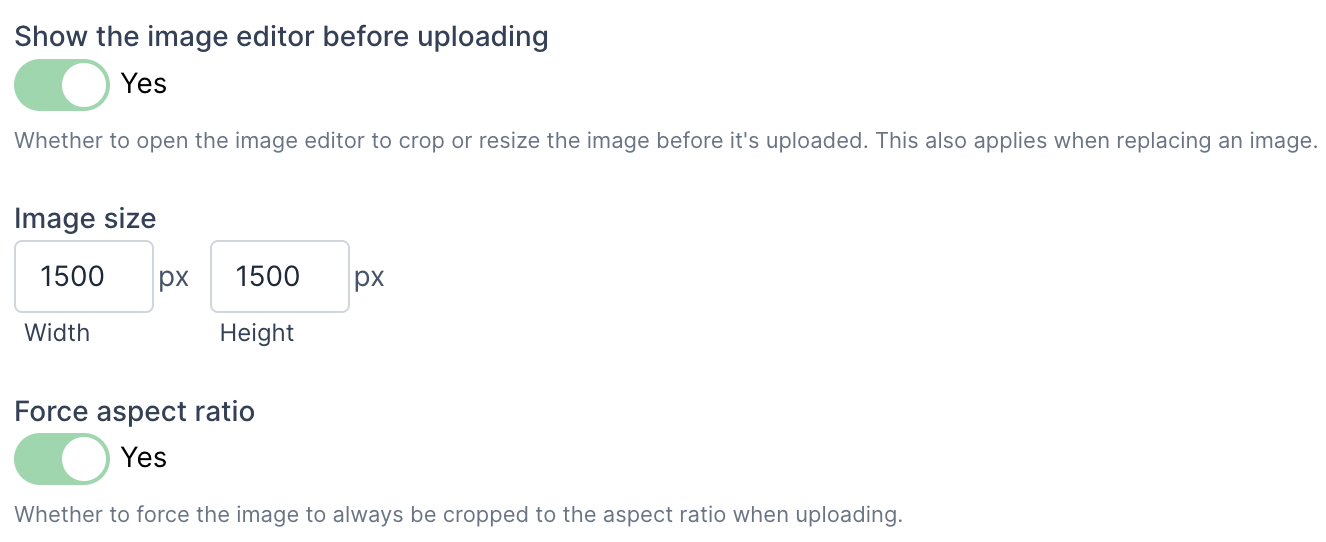
1) There is a new "Show the image editor before uploading" field. Toggle this to "Yes" to always show the editor when uploading.
2) If you set the image size and then turn on the "Force aspect ratio" field, the image editor will always show. This is because the editor is used to crop the image if necessary to fit the aspect ratio.
Directory App Migration to New Admin
We have finished migrating the Directory app to the new administration. This also included some additional improvements.
- Profiles now have a new Phone field that lets you capture the phone type, phone number, and extension in one field. The phone number can also have optional formatting.
- We added support for Tags in the Directory app. This gives another level of organization.
Copying content improvements
We have improved copying app items and other content. Previously, the system would have copied the item behind the scenes and then taken you to the "edit" form.
Now, copying is essentially like adding a new app item, but with the form filled in. Using blog posts as an example, when you copy a blog post a new form will show in a modal and be filled in with the content from the post that you're copying. You can then make any changes and save the new post.
You can also copy app items from two or three spots, depending on the app.
- From the list of app items, click the "three-vertical dots button" and then "Copy".
- From the "Edit" form, click on the "Actions" menu button and then on "Copy".
- If the app has a detail page (like Collection Widgets), then you can copy from there too.
Almost all apps now have extensive copy functionality.
We hope that this gives more flexibility and streamlines copying.
Redirects are now part of the new administration
Migrated the Redirects app to the new administration. It's now found under the Settings menu instead of Site Manager.
Importing themes and editor accessibility improvements
- Added support for importing theme data.
- Added a context menu to the editor for images and links.
- Added support for setting the "aria-label" attribute on navigation items.
- Added accessibility capabilities to the editor:
- Added support for setting the "role" attribute on tables.
- Added support for setting the "lang" attribute on elements.
Improvements when adding or editing images in the rich text editor
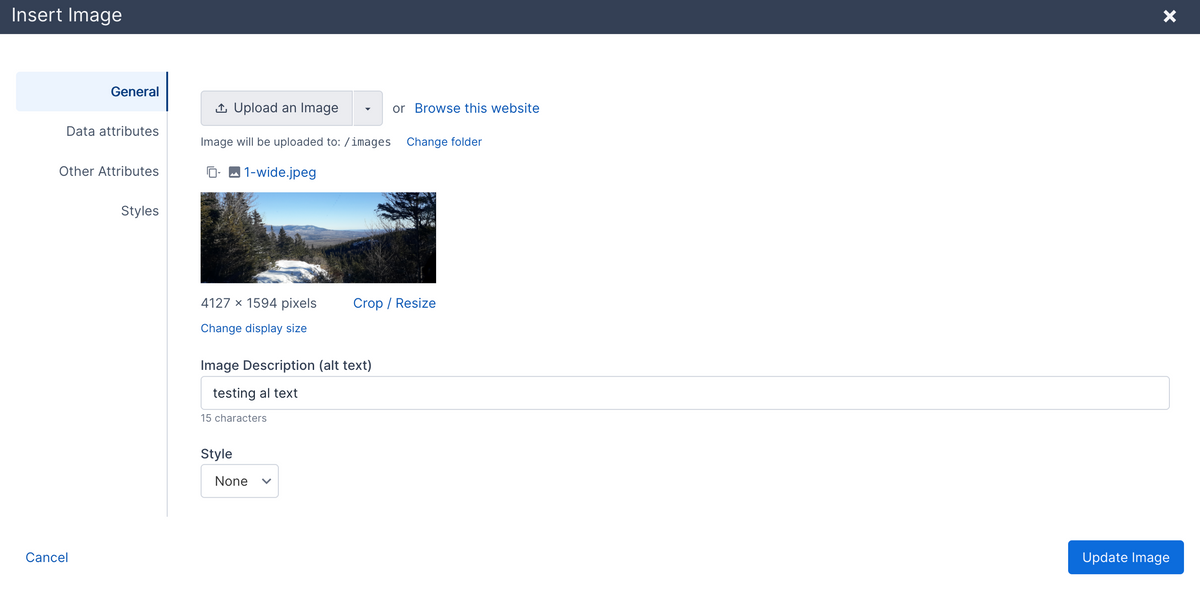
Similar to the link updates in the rich text editor, we also improved the image modal for adding or editing images in the editor.
- You can now change the display size without resizing the image. While we advise resizing the image, this can be useful when you just need to display the image a little smaller.
- The alt text field now shows the number of characters.
- Set custom data attributes on an image.
- Set the title, class, and id attributes.
- Set the image alignment and padding.
- Improved the user interface for setting the margin, border, border radius, and box shadow styles by using specialized fields for those types of styles.
Improvements when adding or editing links in the rich text editor
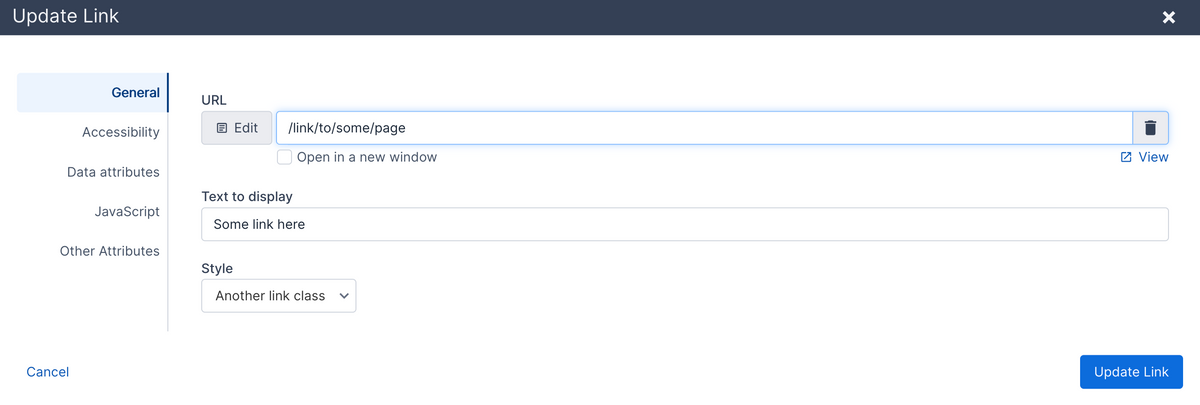
We updated the rich text editor link modal to add more capabilities when you add or edit links.
You can now set more link tag attributes without having to view the source code in the editor.
- Accessibility values such as title, aria-label, and type.
- Add custom data attributes. These are sometimes used for analytics tracking or behavior hooks for JavaScript.
- Set the onclick JavaScript attribute value.
- Set the id, class, and hreflang (language) attributes.
We also add some help text if you try to use link text that is not ideal, such as "click here", "click" or "learn more".
All site settings are now in the new administration
All site settings are now in the new administration.
- Migrated the Security settings to the new administration. Also added a configuration builder for configuring the Content-Security-Policy HTTP header and the Permissions-Policy HTTP header.
- Migrated Routes management to the new administration.
- Migrated the Country, State/Province, County/Region, Town, and IP Geolocation settings to the new administration.
- Migrated the Spam settings to the new administration.
- Migrated the Email integration settings to the new administration.
- Updated the Settings admin navigation to link to a single page instead of showing a very long dropdown. The new Settings page is searchable.
SEO settings migration and Storage app fixes
- Migrated the SEO settings to the new administration.
- Storage - Fixed an issue when reordering units while viewing by building, location, or unit type.
Store app product improvements
- Improvements for managing store product options, modifiers, and SKUs and their pricing.
- Added support for store product location-based pricing. You can price products differently based on a customer's postal code, county, state, or country.
- Improved support for copying product SKU and modifier pricing from other products.
- Added support for setting a town on a Postal Code location value.
- Multiple UI improvements.
June 14, 2026
- Minor updates to user permissions.
- Fixed an issue where the published value for collection widget items wasn't showing in the item's table.
June 10, 2026
- Added support for setting Store app product options and SKUs when editing a product.
- Improved how inventory levels are managed for Store products.
June 6, 2026
Bug fixes
- Pages - Fixed an issue where adding a new page didn't get a default content layout assigned.
Improvements and new features
- Pages - Added support for setting a default block for a content area when adding a new page.
- Store - Added support for bulk assigning a sale price.
Migrated the Real Estate app to the new administration
Updated the Real Estate app to work in the new administration. Properties, agents, app pages, and attributes have been updated.
May 29, 2026
- Fixed issue copying a Block. Previously, some of the block fields would not be copied properly.
- Updated most app tables to include actions for each item. This adds another way to edit, publish, and delete items.
Edit Page form updates and table of contents
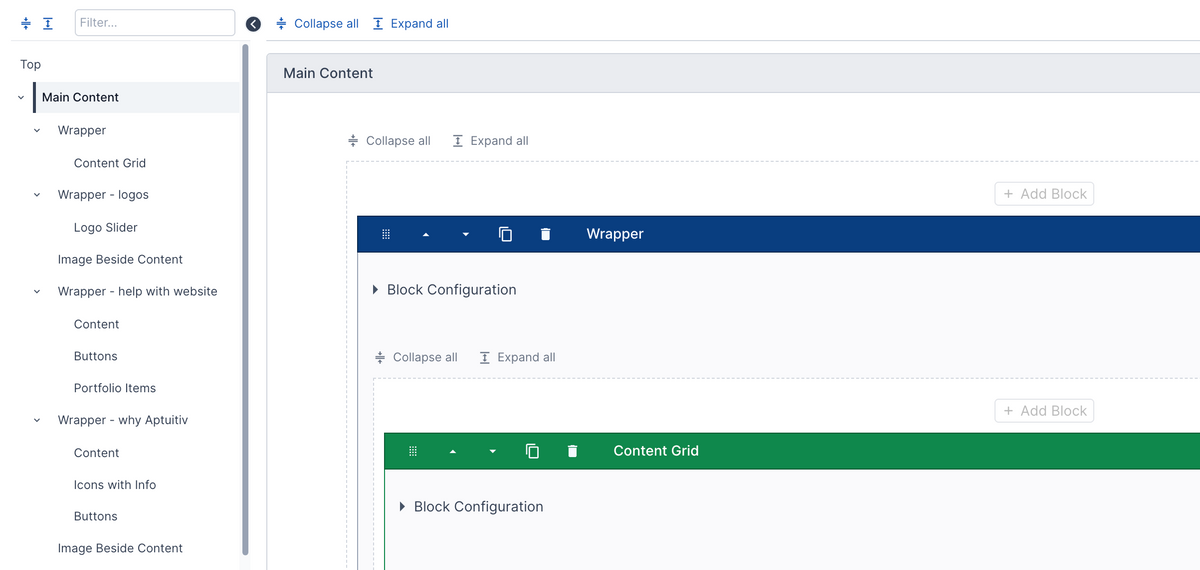
Updated the "Edit Page" form to use the new accordion layout instead of horizontal tabs. This brings a number of (hopefully) improvements:
- Instead of showing the content areas in horizontal tabs, they now show in the table of contents in the sidebar.
- All blocks and content layout fields now show in the sidebar. You can click on one to jump to it.
- You can search the sidebar - useful if you're trying to find a specific block on a long page.
- On apps like the Blog app, this will now include any fields, not just blocks.
The goals with this update include:
- Having a unified view for adding and editing content.
- Making it easier to search for content. Previously, content could be hidden by a tab.
- Prevent having to scroll back to the top just to go to another tab.
- Make it easier to find content to edit.
Please contact us with any feedback that you may have.
May 22, 2026
Improved how error messages are displayed to be more helpful. Also added support for clicking on an error message and scrolling to the field that has the error.
Updated all add/edit forms for app items to use the new accordion view to display groups. This keeps the fields in a linear section and makes it easier to search for fields and scroll.
May 16, 2026
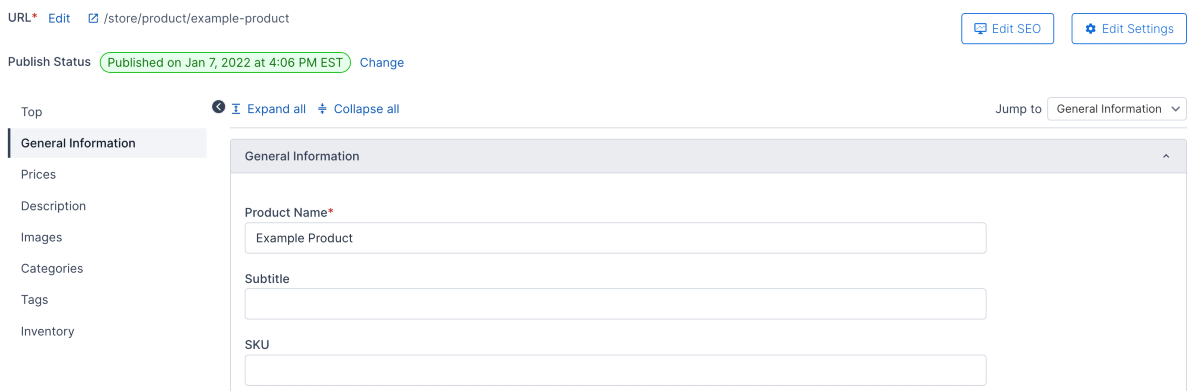
Store products - added a new layout for adding and editing products. Instead of tabs for different attribute groups, they are shown vertically in collapsable sections. There is navigation on the left to jump to a section or highlight the current section that you're one.
We are likely going to use this new layout for all apps in the near future.
May 15, 2026
- Store - migrated email notifications settings to the new admin.
- Store - migrated the partial quantity group settings to the new admin.
- Store - migrated the invoice packing list template settings to the new admin.
- Calendar - added support for automatically filling in the URL Key value if it's missing on older events.
- Fixed issue where the margin and padding field types didn't display a field description.
May 13, 2026
Self-storage: Improved handling of incomplete subscriptions. A subscription can be incomplete if a customer signed an agreement but didn't pay for it.
- Added admin support for deleting incomplete subscriptions.
- Added admin support for activating an incomplete subscription.
May 12, 2026
Store: Migrated store settings to the new admin interface.
Self-storage: Fixed issues where, in rare cases, it was possible to rent a unit that was already rented.
May 7, 2026
Updates to admin users and permissions:
- Added a column to the user table to show if the user has limited permissions.
- Improved the table used to select which page the user can access to allow filtering.
- Added user permissions to Collection Widgets like the old admin had.
May 6, 2026
Collection Widgets have been migrated to the new administration. This brings UI improvements and some new functionality, such as improving the process of copying Collections, Items, Fields, or Templates. We have more new features planned, and this gives us a better foundation to build on.
There is now a new way to set up admin fields to conditionally show based on the value of another field. Previously, you had to set up a "Select Display" field. This limited the controlling field to only a select menu, and all of the logic was in that one field. Now, with any field that isn't an app default field, you can set the conditional display with that individual field. You can select a checkbox, radio, select menu, multi-select, or switch (Select yes/no) field to be the trigger.
We also added support for this new conditional display functionality to work with Blocks. Previously, only app attributes and Collection Widgets had this functionality. Now Blocks do as well.
April 22, 2026
- Improved the display of images in admin item tables. They are now better sized, and you can click on them to view a larger version in a lightbox.
April 21 2026
- Added new "Phone" field type. This allows structured data for phone values such as area code, phone number formatting, and extensions.
- UI improvements to admin navigation.
- Store product administration improvements.
- Added Universal App settings in the new administration.
April 16, 2026
- Boards app - updates to managing members and meetings.
April 15, 2026
- Boards app - added support for customizing the columns that show in admin tables.
April 14, 2026
- Migrated the localization settings to the new administration.
- Fixed issues with bulk reindexing the website where some items might be skipped.
April 8, 2026
Added support for exporting universal app items and blog posts to a CSV file. We'll be adding this to more apps soon.
Improvements to the publish status display when adding or editing app items.
April 2, 2026
Self-Storage app updates:
- Added support for viewing subscriptions and invoices by building, unit, or unit type.
- Added support for updating a subscription to the current unit type price.
- The subscription list and detail page now show if the subscription is a different price than the unit type price.
- Added support for editing a subscription invoice.
March 30, 2026
Migrated the Store app Product Options and Product Option Groups to the new administration UI.
March 25, 2026
Migrated payment and credit card settings to the new admin UI.
Improved column widths for admin tables, particularly with user-specified columns.
March 21, 2026
Self-storage app updates
- Renamed Unit Groups to Buildings.
- Added support for images as a default attribute for buildings, locations, units and unit types.
- Migrated more settings pages to the new administration.
March 20, 2026
- Improvements to how public accounts and customer accounts are created and managed.
- Fixed a bug where a username and password wouldn't sometimes be set up for a new customer account.
March 16, 2026
More migrations of functionality to the new administration.
- Migrated the Calendar Events functionality to the new administration.
- Migrated Templates and Snippets to the new administration.
March 14, 2026
Self-storage app updates
- When adding or editing a customer, you can now edit the customer address, company name, alternate name, and additional phone numbers.
- Importing Customers, Buildings, Locations, Units, and Unit Types works in the new admin.
- Added support for editing the storage subscription start date.
- Added a new Notes section to view, delete, and update notes that are added to customers, subscriptions, transactions, or invoices. You can also change the author for a note.
- Notes can now be moved from a customer to a subscription and vice-versa.
- Notes can now be imported.
March 9, 2026
Migrated the Locations, Buildings, Units, and Unit Type functionality for the Self-Storage app to the new administration.
March 7, 2026
- Fixed an issue where sometimes the image editor would freeze when editing an image.
- Added support for automatically clearing files from the CDN when you delete, replace, or move a file.
- Added support for bulk editing the name and field key for Content Layout fields.
March 5, 2026
- Migrated the Document app to the new administration.
- Fixed bug where categories from the wrong app instance were shown when adding and updating app items.
- Added support for bulk updating Block descriptions. You can also export and import the descriptions as a JSON file to help with updating multiple websites.
March 3, 2026
- Migrated the "SEO" section for apps to the new administration.
- Added support for copying Content Layout fields. You can copy from the "Edit field" page, or from the list of fields table.
February 27, 2026
Import and export block fields
You can now select and export one or more block fields as a JSON field. You can then import those fields into another block. This is very useful if you need to set up similar fields on multiple blocks or copy block fields to another website.
New admin UI updates
App Pages are now part of the new admin UI for the Blog, Calendar, Store, Storage, Trails, and Universal app.
Self-Storage merge customers
You can now merge two customers together. This is helpful if you have duplicate customer profiles. Go to the customer profile that you want to merge into, click the menu button in the top right, and then click "Merge customers". Select the customer that you want to merge. All subscriptions, invoices, transactions, and notes will be merged in and the old customer will be removed.
February 25, 2026
More things migrated to the new administration. These complete the migration of all of the items under the "Content" navigation menu.
- Content Snippets have now been migrated to the new administration. This also includes improvements to the UI when adding or editing Content Snippets.
- Page Settings have also been moved to the new administration.
February 22, 2026
Added support for exporting one or more blocks and importing one or more blocks. Go to Design -> Blocks to do this. The blocks get downloaded as JSON.
This makes it easier to copy blocks from one website to another. Importing blocks adds new ones and does not overwrite existing ones.
You can also go to the block detail page to export a single block. You can import the JSON for a single block on that page to update and overwrite the existing block fields, settings, and template.
February 20, 2026
Moved the search indexing to the new administration. This allows updating the search index with content that was saved in the new administration format. It also improves the UI for reindexing the website content.
February 18, 2026
- Added support for bulk assigning blog posts to an author.
- Improved displaying categories in app item list tables.
February 17, 2026
More things have been moved to the new administration.
- Breadcrumb settings.
- Rich text editor settings and rich text editor buttons.
- Security settings.
Other changes:
- Updated the navigation for the Navigation and Block apps. The sub navigation now appears in the left sidebar instead of the top-right.
February 13, 2026
We've been migrating more functionality to the new administration.
- App categories are now managed in the new administration. This also adds drag-and-drop support for categories, allowing you to reorder them or move them under a different parent category.
- You can now filter app items and blog posts by category or tag when viewing in the administration. This can make it easier to find and reorder items when they are displayed by category on the website.
- You can bulk assign categories and tags to app items and blog posts.
- You can bulk feature and un-feature app items and blog posts.
- Favicon settings are now in the new admin.
Bug fixes
- Search and replace functionality now works better with searching for URLs.
- Fixed issue where the first field in a repeating grid wasn't focused properly when adding a new row.
- Fixed issue with editing some navigation items, and the menu wouldn't load properly after editing.
February 5, 2026
User management updates
- Added support for inviting a user to an account.
- Added support for unassigning a user from multiple domains when viewing the user profile.
- Added support for clearing the user configuration values. (User configuration is used for the user interface configuration. For example, which columns to sort a table by. None of it is critical information, and it's safe to clear.) View your user details to clear.
Self-storage app updates
- Updated the subscription page to improve how the information is displayed. We're now using tabs to show the subscription details, invoices, and transactions. This also includes information about whether the customer has a payment method on file when viewing invoices.
- Updated the way a failed payment notification is displayed on the invoice payment page. It no longer shows in the upper right, which could hide the payment button.
- Updated the invoice detail page to improve how the invoice and invoice transactions are displayed. If the customer does not have a payment method then that is displayed, and a link to record a payment is shown.
Bug fix
- Fixed the issue where the form error wasn't automatically hidden after leaving the form and navigating to another page.
February 4, 2026
We have released several updates to the user management functionality in Aptuitiv. Some of the highlights include:
- You can access the new user management from three spots.
- From your dashboard, click the website you want to manage users for.
- If you're logged into a website, click the "Users" navigation item at the top, then select "Admin Users."
- If you're logged into a website, you can also click the User icon in the top-right and then select "Manage website users".
- You can view users and domains in each account.
- You can remove users from an account or domain.
- There is a new "Website Admin" user type that has full access to the domains it's assigned to and can manage users for that domain.
- You can now set the user type when inviting a user.
- User types permissions are enforced. The Website Editor user type can only view information.
January 26, 2026
Import Universal app items into the new administration
You can now import Universal app items into the new administration using a CSV file. This is another feature that the old admin had, and now the new one does too.
The import process has also been improved to better handle importing into repeating fields.
You can optionally choose to assign the imported items to one or more categories during the import process.
January 21, 2026
Import blog posts into the new administration
You can now import blog posts into the new administration using a CSV file. This is another feature that the old admin had, and now the new one does too.
The import process has been improved to better handle large CSV files.
You can optionally choose to assign the imported posts to one or more categories during the import process.
January 8, 2026
Improvement
- Added support for changing the upload path for file and upload components. This allows a user to select a different folder other than the configured folder to upload to.
Bug fixes
- Fixed issue where the navigation cache wasn't cleared when reordering navigation items by dragging and dropping.
- Fixed issue with the file browser where you couldn't always drag and drop a file to upload.
- Image upload component: fixed the issue where editing an image that was in a different directory than the configured directory path would upload the edited image to the wrong directory path.
January 3, 2026
Fixed issues with saving content in the new administration and indexing that content in the search engine.
Before this fix, not all data would be indexed. For example, values for custom attributes for an app item wouldn't be saved in the search index.
We also improved data saving in the search index so that only the raw data is indexed. In the old admin, the fully rendered HTML content for a page would be indexed, potentially including unwanted content in the search index.
December 20, 2025
Numerous improvements to the performance of tables.
December 18, 2025
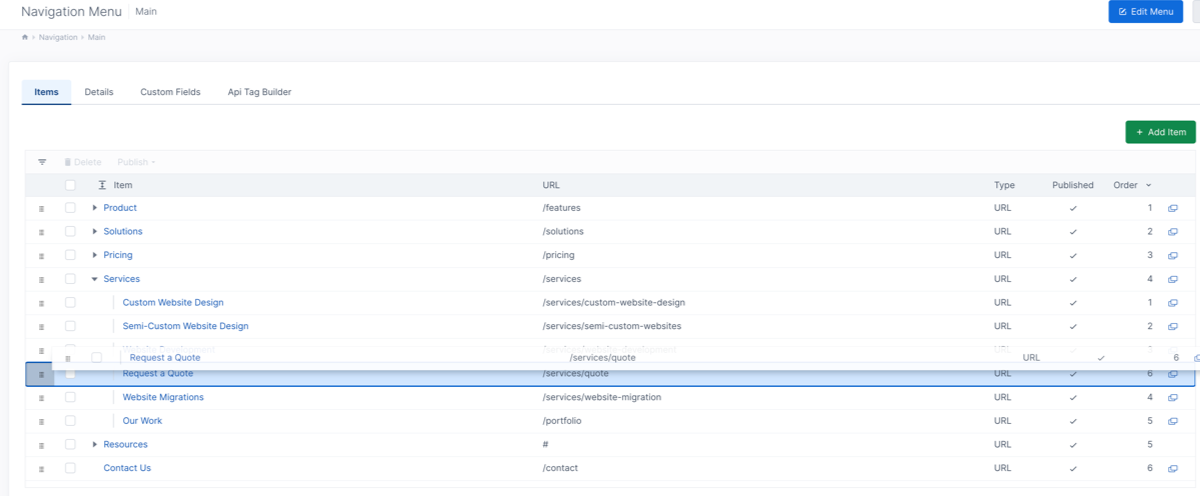
Added support for dragging and dropping table rows to reorder or reorganize table items.
The old admin support drag-and-drop reordering works for some items, but not for nested rows.
The new functionality supports dragging table rows up and down to reorder. You can click and hold on the "drag" icon on the left of the row, or click and hold anywhere on the row.
If the table supports nested rows, you can:
- Drag items up and down within the parent row.
- Drag items to the left or right to change the parent item.
- Drag a row and hover over another row to expand it and move the dragged row as a child to the other row.
- Drag an item out of its parent row to another row level.
This will be used to reorder and reorganize app items via drag-and-drop.
We initially set this up for navigation menu items and will add it to more tables soon. For navigation items, you can drag and drop to reorder items or to change the parent of an item.
November 25, 2025
Updated the API field types to support built-in "app item name" API calls.
This makes it easier to create API field types that need to display a list of app items, categories, or tags.
November 20, 2025
Improved the preview feature of the Embed and YouTube components. Previously, previewing would show an error.
We also fixed an issue that prevented new public users from registering a new account.