The Aptuitiv trails app enables you to display searchable hiking, walking, biking, or paddling trails on your website.
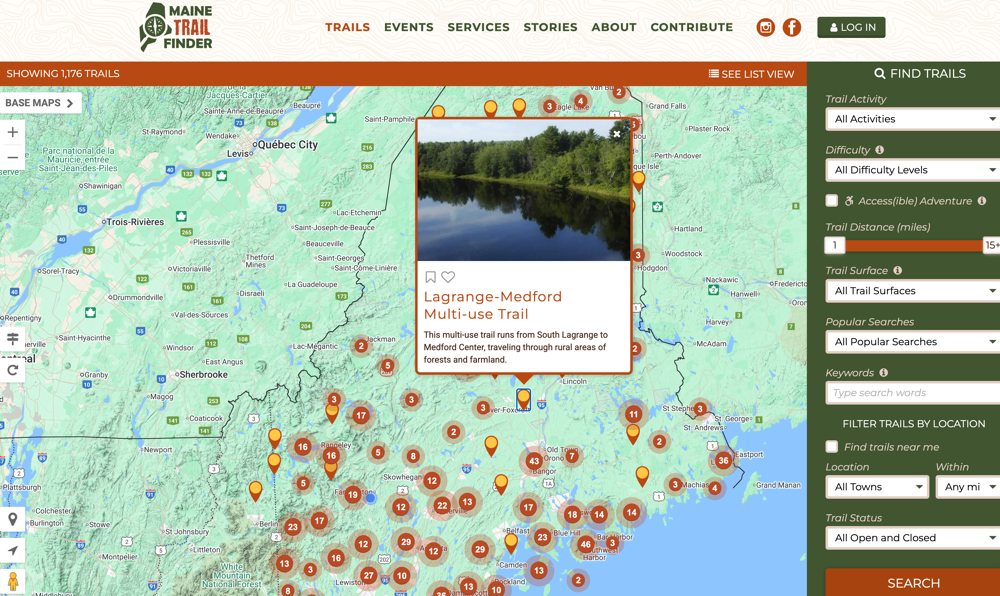
(Maine Trail Finder is a good example of a trail website using our Trails app.)
Pricing
Trails: $20 / month + core Aptuitiv platform.
We recommend starting with the Aptuitiv Plus version so that your community can log in to track their trails and build their trail wishlist.
The Aptuitiv Pro version is required if you want to allow account holders to add their own images to trails.
Customizable for your needs
The information that you can set for the trails is very customizable. The Trails app comes with default attributes such as name, length, difficulty, and description. You can easily add custom attributes to store the information that you need for each trail. And all of that information is searchable.
Some customers want to group trails together. They do that by creating a custom attribute that allows them to select "related trails" when adding or editing a trail. They can then display the related trails along with the trail information on a map. For example, see the Cobscook Shores trail on Maine Trail Finder. Under the "Trail Map" tab and below the map, you can toggle on/off the "connector trails". This isn't a built-in feature of the Trails app; instead, it shows how customizable it is to meet your website's needs.
You can use any design that you want for the Trail app pages. While Google Maps is often used, you can display the trail information on any map platform, such as OpenStreetMap. The templates provide the raw geo data so you can display the line segments or points of interest however you want.
Precise geolocation trail data
The feature that makes our Trails app so useful is that it can parse KML or GeoJSON data to store the trail line segments or points of interest along the trail. You would generate GPS data for your trails and then use software like ArcGIS, QGIS, OpenGIS, or Google Earth to process the GPS data and export it as a KML or GeoJSON file. Our app will read that data and save the GPS data with the trail, so you can display the trail lines on a map or use it in search to help someone find trails near them.
Engage users with accounts and badges
Your visitors can create an account and favorite trails or add trails to a wishlist. They can also create diary entries to keep track of the trails they've completed.
You can set up badges that accounts can earn for their diary entries. For example, they can earn a badge if they complete certain trails, log a certain number of miles, or log trails for a specific activity.
Example websites
Here are some example websites that are using the Aptuitiv Trails app. We built most of them, but other developers built a few.
Carolina Thread Trails
Their main website is on a different platform, and they use Aptuitiv for just the trails portion of their website.
Designed by Community Geographics and built by Aptuitiv.
Connecticut Trail Finder
Designed by Community Geographics and built by Aptuitiv.
Maine Trail Finder
The original trail website that our Trails app was first built for. The website has gone through 4 revisions over the last 10+ years.
Designed by Community Geographics and built by Aptuitiv.
Nevada Trail Finder
Designed by Community Geographics and built by Aptuitiv.
Paddle South Carolina
This one has two trail sections, both related to paddling. They used two different instances of the Trails app to manage waterways and individual trips.
Designed by Community Geographics and built by Aptuitiv.
Palmetto Trails
Designed and built by Aptuitiv.
QC Trails
Designed by Community Geographics and built by Aptuitiv.
South Carolina Trails
Designed and built by another website agency.
STLC Trails
This is a trail site for the St Lawrence Chamber of Commerce in NY.
Designed by Community Geographics and built by Aptuitiv.
Trail Finder
This trail site is for trails in Vermont.
Designed by Community Geographics and built by Aptuitiv.
Feature List
Below is a list of core features for the Trails app.
Trails
- Add, edit, and delete trails. Each trail should have KML data for the geo data. You can set custom attributes for the data that you need, including images.
- Easily publish or unpublish trails.
- You can unpublish trails and work on them as a draft until they're ready to go live.
- Customize the KML/GeoJSON format. We currently support ArcGIS, QGIS, and OpenGIS/Google Earth formats.
- Customize the activities that you can associate with trails. For example, walking, hiking, biking, skiing, etc. The activities can be used in the search or when a user adds a diary entry.
- Customize the counties and towns that can be associated with a trail. This can be used for location searching.
- Import trails, counties, and towns from CSV files.
- Export trail data as a CSV file.
Trail Alerts
Trail alerts are messages, warnings, or alerts that you want to show on one or more trails. For example, they can be notices about not littering, trail closures, or updates on trail access.
- Publish trail alerts that you can assign to one or more trails.
- Alerts can have a specific start and end date. They can also repeat on a time schedule, which is helpful for seasonal alerts.
- Alerts are available to display with the trail data in all templates that include that trail.
- Bulk assign alerts to one or more trails.
- Trail alerts can be imported from a CSV file.
- Export trail alerts as a CSV file.
Trail features (points of interest)
You can set up the trail features (points of interest or POIs) that you want to associate with trails. This lets you customize the icon each trail feature uses. When the KML/GeoJSON for the trail is parsed, the trail feature is extracted and saved with the trail.
You can also bulk-associate the trail feature icons with trails if you change them later.
Parks
You can add parks and then assign one or more trails to a park. The parks can be used for searching or when entering trail diaries. In the future, we'll add support for having individual park pages to display trails.
Contacts
Manage the organization or individual contacts for a trail. This is useful for showing the organization or person managing the trail.
You can assign a contact to one or more trails.
Accounts
Visitors can create an account. They can do the following in their account:
- Add a trail to their Favorite list.
- Add a trail to their Wishlist.
- Add a diary entry that lets them mark a trail as completed or not, record the miles completed on the trail, and add a note. Diary entries can be logged on a trail or a park (if you use parks).
- View the badges they earned and share them on social media.
- Edit their account data, including their login information and image.
- Accounts can also add comments to trails if you allow them to.
- You can also allow accounts to add images to a trail.
Badges
You can create custom badges that users can earn when they add diary entries. Each badge can have a name, image, description, and the rule type. You can also add custom attributes to badges to store other information.
There are several built-in rules for determining when a user can earn a badge. A badge can be awarded when a user:
- Adds diary entries for a certain number of hikes for each specified activity.
- Adds diary entries for a certain number of hikes with a certain activity.
- Complete all specified trails.
- Complete a certain number of specified trails. The same trail can be completed multiple times.
- Complete a certain number of trails. The same trail can be completed multiple times.
- Complete a certain number of trails within a certain number of days. The same trail can be completed multiple times.
- Complete trails in a certain number of the specified parks.
- Complete at least one trail in all specified parks.
- Add a certain number of diary entries.
- Add diary entries with mileage equal to or greater than the specified value.
- Add diary entries with mileage equal to or greater than the specified value for a certain activity.
- Add diary entries with mileage equal to or greater than the specified value for each specified activity.
- Add diary entries with mileage equal to or greater than the specified value for one or more of the specified parks.
- Add diary entries with mileage equal to or greater than the specified value for one or more of the specified trails.
- Complete a certain number of unique trails within a certain number of days.
- Complete a certain number of unique trails.
All badges can be optionally restricted to a date range or to an annual repeating date range.
You can also organize badges by badge categories. This can help when you have many badges to display on your website.
Reporting
Get reports on the diary entries that are entered by users. You get the following information:
- Percentage of accounts that added a diary entry.
- Number of trails that have at least one diary entry.
- Total number of diary entries filled out.
- Percentage of accounts that have marked a trail as completed, favorite, or wishlist.
- Number of unique trails marked as completed, favorite, or part of a wishlist.
- Total completed, favorite, or wishlist trails across all users.
- Percentage of accounts that have earned each badge.
- Filter the reports by date.
- Total number of accounts that earned each badge.
- View individual diary entries and export as a CSV.
SEO
All of Aptuitiv is SEO friendly. Within the Trails app, you can do the following:
- Customize the page title and description for all app pages.
- For app pages, like the trail detail pages, you can use variables to output individual trail information as part of the page title.
- Customize which app pages are included in the sitemap.xml file.
- Within the templates, you can specify Open Graph data if you want for social sharing.
Embeddable views
Embeddable views let you create custom trail pages that display one or more trails at a specific URL. This is commonly used to display some of the trails on third-party websites within iframes.
You can choose which trails are included in each embeddable view.
Customization
Like the rest of Aptuitiv, the Trails app is very customizable. For example, you can;
- Create custom attributes for badges, badge categories, contacts, embeddable views, parks, trails, trail features, and trail segments.
- Have complete control over the templates, HTML, CSS, and JavaScript used on the website.
- Choose the mapping platform you want to display the trail information on. Google Maps is commonly used, but you can also use OpenStreetMap or any other platform you prefer.