Redirects are now part of the new administration
Migrated the Redirects app to the new administration. It's now found under the Settings menu instead of Site Manager.
Added support in the file browser for removing a file from the CDN
Added support in the file browser for removing a file from the CDN. When a file is deleted or updated, it's removed from the CDN. This new feature helps in rare cases when the file still exists in the CDN.
To use this, click on the file in the browser. In the right-side panel, click the menu button next to the view/download link.
Text input fields now have a format option to them
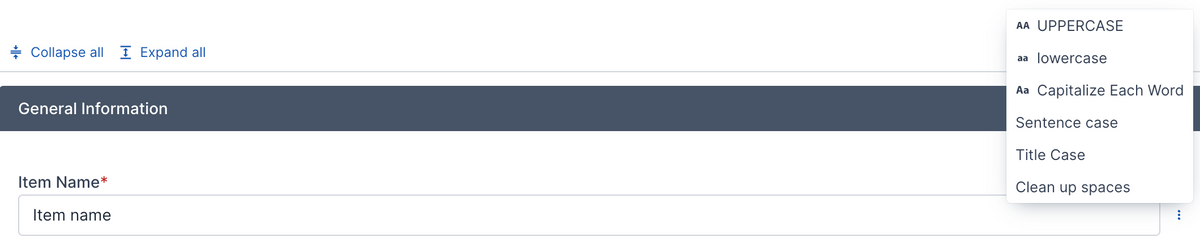
Text input fields now have a format option to them. When you hover over a text input field or click into it, a menu button shows after the field. Click the button and options to format the text show. You can do the following:
- UPPERCASE: Convert all letters to uppercase.
- lowercase: Convert all letters to lowercase.
- Capitalize Each Word: Make sure that the first letter in each word is capitalized. Other letters are lowercased.
- Sentence case: Capitalize the first letter in each sentence (or the start of the text) and lowercase everything else.
- Title Case: Capitalize the first letter of each word except for small words like "is", "and, "in", "or".
- Clean up spaces: Remove any spaces before or after the text and redundant spaces between words.
Importing themes and editor accessibility improvements
- Added support for importing theme data.
- Added a context menu to the editor for images and links.
- Added support for setting the "aria-label" attribute on navigation items.
- Added accessibility capabilities to the editor:
- Added support for setting the "role" attribute on tables.
- Added support for setting the "lang" attribute on elements.
Improvements when adding or editing images in the rich text editor
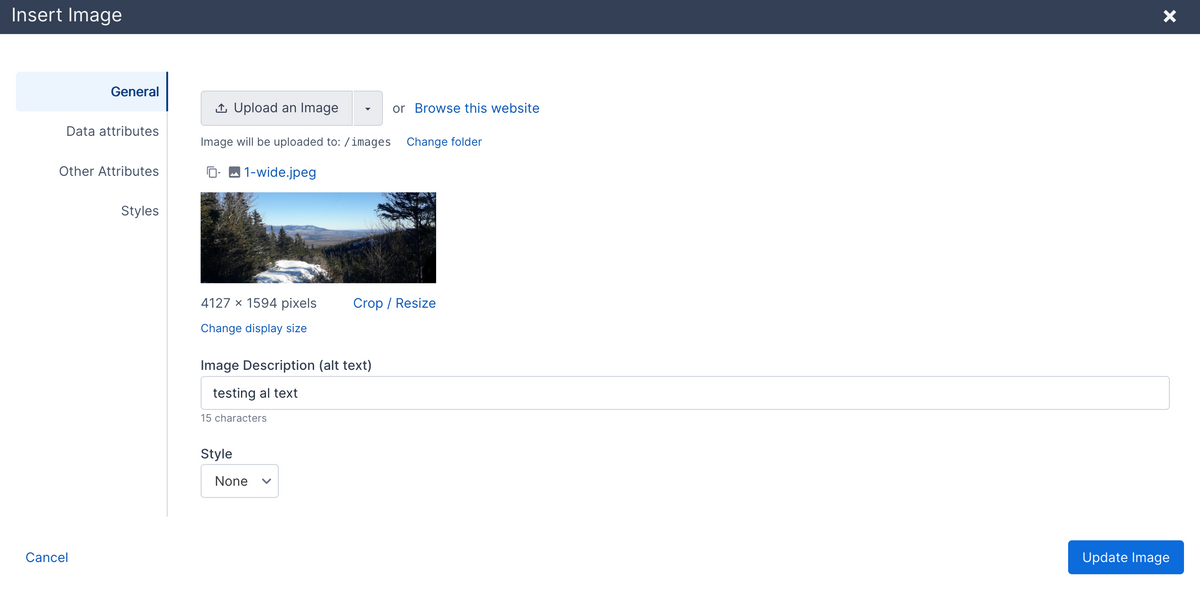
Similar to the link updates in the rich text editor, we also improved the image modal for adding or editing images in the editor.
- You can now change the display size without resizing the image. While we advise resizing the image, this can be useful when you just need to display the image a little smaller.
- The alt text field now shows the number of characters.
- Set custom data attributes on an image.
- Set the title, class, and id attributes.
- Set the image alignment and padding.
- Improved the user interface for setting the margin, border, border radius, and box shadow styles by using specialized fields for those types of styles.
Improvements when adding or editing links in the rich text editor
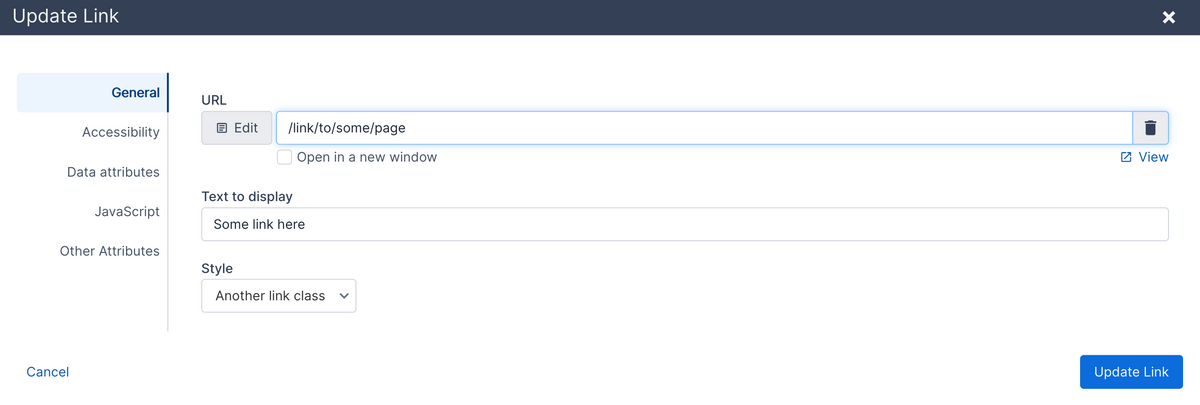
We updated the rich text editor link modal to add more capabilities when you add or edit links.
You can now set more link tag attributes without having to view the source code in the editor.
- Accessibility values such as title, aria-label, and type.
- Add custom data attributes. These are sometimes used for analytics tracking or behavior hooks for JavaScript.
- Set the onclick JavaScript attribute value.
- Set the id, class, and hreflang (language) attributes.
We also add some help text if you try to use link text that is not ideal, such as "click here", "click" or "learn more".
More support for importing and exporting content as JSON
Added support for exporting and importing more content as JSON.
- Content areas can now be exported and imported.
- Navigation menus can now be exported and imported.
- Content layouts and content layout fields can now be exported and imported.
All site settings are now in the new administration
All site settings are now in the new administration.
- Migrated the Security settings to the new administration. Also added a configuration builder for configuring the Content-Security-Policy HTTP header and the Permissions-Policy HTTP header.
- Migrated Routes management to the new administration.
- Migrated the Country, State/Province, County/Region, Town, and IP Geolocation settings to the new administration.
- Migrated the Spam settings to the new administration.
- Migrated the Email integration settings to the new administration.
- Updated the Settings admin navigation to link to a single page instead of showing a very long dropdown. The new Settings page is searchable.
SEO settings migration and Storage app fixes
- Migrated the SEO settings to the new administration.
- Storage - Fixed an issue when reordering units while viewing by building, location, or unit type.
New Store app reports
Add Store app reports. You can now view store orders for different date ranges, compare against the previous period, view top products ordered, and view products ordered in different time periods.