New - Send emails to self-storage customers
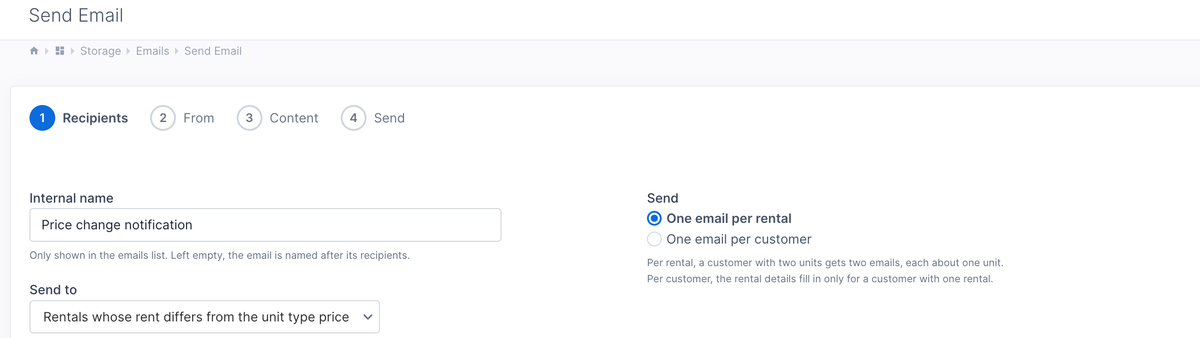
For our self-storage customers, this one is a big update. You can now send non-marketing emails to customers. This lets you send emails about pricing updates, facility maintenance, outages, and other notices.
If you need to send marketing emails, our Campaigns app is the best choice, as it supports unsubscribing, which you need to stay compliant with spam laws.
Because this new feature is designed for notices, you can send smart, personalized emails about pricing changes and include each customer's name, current rental price, and unit-type prices. This is done by adding variables when you write the email content. You can do this easily under the "Insert" menu for the text editor when writing the content - no code required.
There are multiple ways to choose who to send the email to.
- From the Customers page, you can email all customers or select specific customers.
- From the Subscriptions page, you can email all renters or select specific renters to email.
- From the Email page, when sending a new email, there are multiple pre-defined filters to pick from, such as:
- All customers
- Customers with active rentals
- Customers without a rental
- Customers with only canceled rentals
- Customers that never rented
- Rentals whose rent differs from the unit type price - this one is useful for sending pricing change notifications.
Once you have your list of people to send to, you can go further and remove specific people if you need to. You can also choose to send one email per rental, or one email per customer. Sending one email per rental is ideal for pricing notices. Sending one email per customer is better for other notifications.
Go to Apps -> Storage -> Emails to get started.