Customize where Collection Widget items can be displayed
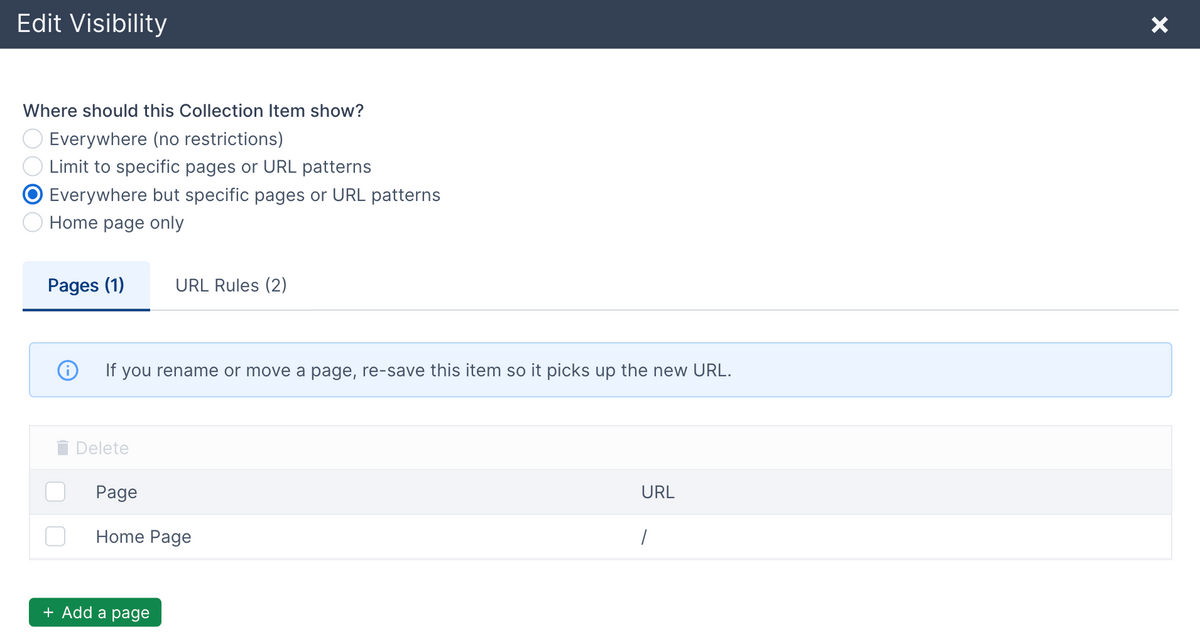
If your website is displaying a collection widget on all pages, you can now limit which pages it will show on without having to change your templates.
A practical example is if you're using a collection widget to show a notification banner at the top of all pages. Or, if you're using it to show a popup message. You don't always want those to show on all pages.
In the past you'd have to customize where a collection widget showed in the site templates.
Now, all collection widget items can be individually customized to set where they show. There are a few different options:
- Show it on all pages. This is the default.
- Limit to specific pages and/or URL patterns.
- Show everywhere but specific pages and/or URL patterns.
- Show on the home page only.
You can select specific pages or app pages to show or hide the item on. You can also set URL patterns to apply to a group of pages. The following patterns can be used:
- URL starts with
- URL contains
- URL ends with
- Exact URL
- URL path with wildcards
You can set the visibility for collection items when adding or editing an individual item. You can also bulk apply visibility settings to multiple items at the same time from the table of items.
You can also set a default visibility configuration when you add or edit the collection itself.